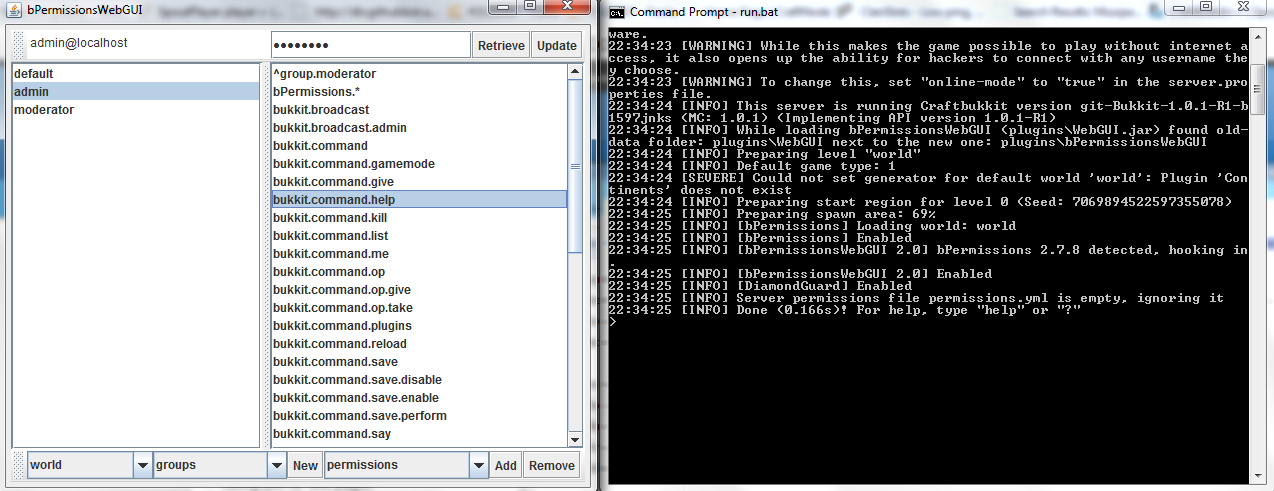
bPermissionsWebGUI
bPermissionsWebGUI
The next step forward in ease of management of permissions!
You will need the plugin WebGUI_Plugin.jar and the client-side application WebGUI_Client.jar available in the WebGUI.zip package.
Don't forget to donate if you liked this! I worked HARD to make this all secure + working so show a little appreciation :)
Installation
Installation is as easy as dragging/dropping into your plugins folder and running once to generate the config.yml for this plugin.
After this is generated you will have a file that looks like this:
bind-port: 4545
bind-ip: ANY
username: admin
password: password
whitelist-ip:
- 127.0.0.1
- localhost
bind-port is the port that the webgui binds to, bind-ip is the ip that the webgui binds to (set to ANY to allow for any ip bindings) and the whitelist-ip section is a list of ips that are allowed to connect by default (you can add more via commandline/ingame auth.
username/password are fairly self-explanatory, these are the username/password you must enter in the gui client in order to be able to access the server!
Then, just start up the client and input your server details and password. The server-format should be like this:
username@host
or if you have a non-standard (not 4545 port)
username@host:ip
username@host:4545
Connections/Security
There are a few ways to be allowed to connect:
- Have your ip in the whitelist-ip section
- Use the allowip YOURIP command from the console
- Be logged into the game and have the permission node bPermissions.gui
- Make sure and enter the correct username/password too!
Permission nodes/Commands
There is one command
/allowip YOURIP
This works like /allowip 127.0.0.1
Allows ips to be added without needing to be in-game.
There is one permission node
bPermissions.gui
This allows you to be logged into the game and access the panel without auth (only while logged in) as well as allowing you to use the /allowip command.

Comments


%2526business%253dbenbenben001%2540googlemail.com%2526bn%253dPP-DonationsBF%253abtn_donateCC_LG.gif%253aNonHosted%2526cancel_return%253dhttp%253a%252f%252fdev.bukkit.org%252fserver-mods%252fbpermissionswebgui%252f%2526lc%253dUS%2526item_name%253dbPermissionsWebGUI%2b(from%2bBukkit.org)%2526cmd%253d_donations%2526rm%253d1%2526no_shipping%253d1%2526currency_code%253dUSD)
-

Forge_User_53439273 Owner
-
View User Profile
-
Send Message
Posted Jun 18, 2016I know the author has been gone forever on this one, but has anyone picked the project up or forked/created their own newer version?
-
View User Profile
-
Send Message
Posted Sep 27, 2015@Paxination
I use WebGUI with older bpermission plugin because when I tried to update, player names came out as UUID. No clue who the player is...So, you said you use latest bpermissions. I would like to know what version you use and if player names still come out in WebGUI as UUID or do they show up as readable usernames?
-
View User Profile
-
Send Message
Posted Jun 28, 2015Works fine for me. Im using the latest bperms. You also can not use the plugin from the zip, download the latest entry for that.
-
View User Profile
-
Send Message
Posted Jun 15, 2015When I press retrieve I get this in my console.
[21:12:00 WARN]: java.lang.NoSuchMethodError: de.bananaco.bpermissions.api.World.getAll(Lde/bananaco/bpermissions/api/util/CalculableType;)Ljava/util/Set; [21:12:00 WARN]: at de.bananaco.webgui.JSONStringWriter.encode(JSONStringWriter.j ava:32) [21:12:00 WARN]: at de.bananaco.webgui.RequestHandler.run(RequestHandler.java:59) [21:12:00 WARN]: at java.lang.Thread.run(Unknown Source)
If you would get a fix for this it would be greatly appreciated
-
View User Profile
-
Send Message
Posted Sep 8, 2014For those asking how to connect what you do is set the top left to be
admin@SERVERIP
or
admin@localhost if you are running it from your own computer
-
View User Profile
-
Send Message
Posted Jul 21, 2014@madtomic
As long as bPermissions is working, yes.
-
View User Profile
-
Send Message
Posted Apr 24, 2014Can I use with cb1.7.2-r0.3?
-
View User Profile
-
Send Message
Posted Apr 21, 2014@CarolinaFlower @2toetommy
(http://dev.bukkit.org/bukkit-plugins/bpermissionswebgui/?comment=146)
<<quote>>AtreyuMarcs - Aug 8, 2013 at 15:13Download the WebGUIPlugin (from recent files list) and drop that in your server plugin folder and restart.
Then download the v3.0 zip (next file down in recent files list) and extract the client jar. The other file here can be deleted.<</quote>>
-
View User Profile
-
Send Message
Posted Apr 17, 2014Hi, I keep getting this error when I push the "retrieve" button
"03:09:35 [SEVERE] Exception in thread "Thread-18" 03:09:35 [SEVERE] java.lang.NoSuchMethodError: de.bananaco.bpermissions.api.Worl d.getAll(Lde/bananaco/bpermissions/api/util/CalculableType;)Ljava/util/Set; 03:09:35 [SEVERE] at de.bananaco.webgui.JSONStringWriter.encode(JSONString Writer.java:32) 03:09:35 [SEVERE] at de.bananaco.webgui.RequestHandler.run(RequestHandler. java:59) 03:09:35 [SEVERE] at java.lang.Thread.run(Unknown Source)"
Any fix or am I making a noob mistake somewhere?
-
View User Profile
-
Send Message
Posted Feb 21, 2014@2toetommy
Yhh where is the client?
-
View User Profile
-
Send Message
Posted Jan 30, 2014Um, the gui definitely is not working. I have connected, the ports are all open, when I click update the console says it has been updated but still there remains to be something seen on the gui that has to do with permissions.
-
View User Profile
-
Send Message
Posted Dec 28, 2013Were is the client ????
-
View User Profile
-
Send Message
Posted Nov 30, 2013Getting an error when i try to connect via the client.
[SEVERE] Exception in thread "Thread-56" [SEVERE] java.lang.NoSuchMethodError: de.bananaco.bpermissions.api.Calculable.serialiseGroups()Ljava/util/List; [SEVERE] at de.bananaco.webgui.JSONStringWriter.encode(JSONStringWriter.java:38) [SEVERE] at de.bananaco.webgui.RequestHandler.run(RequestHandler.java:59) [SEVERE] at java.lang.Thread.run(Unknown Source)
-
View User Profile
-
Send Message
Posted Nov 1, 2013Sure there's a WebGUI_Server.jar in the WebGUI.zip file, but your instructions talk about a WebGUI_Plugin.jar file when I downloaded one called bPermissionsWebGUI.jar on this page. I treated this file like the plugin jar from your instructions, but it didn't work.
-
View User Profile
-
Send Message
Posted Nov 1, 2013I get this error when I follow those directions.
04:06:50 [SEVERE] Exception in thread "Thread-12"
04:06:50 [SEVERE] java.lang.NoClassDefFoundError: de/bananaco/bpermissions/api/WorldManager
04:06:50 [SEVERE] at de.bananaco.webgui.JSONStringWriter.encode(JSONStringWriter.java:20)
04:06:50 [SEVERE] at de.bananaco.webgui.RequestHandler.run(RequestHandler.java:59)
04:06:50 [SEVERE] at java.lang.Thread.run(Thread.java:695)
04:06:50 [SEVERE] Caused by: java.lang.ClassNotFoundException: de.bananaco.bpermissions.api.WorldManager
04:06:50 [SEVERE] at java.net.URLClassLoader$1.run(URLClassLoader.java:202)
04:06:50 [SEVERE] at java.security.AccessController.doPrivileged(Native Method)
04:06:50 [SEVERE] at java.net.URLClassLoader.findClass(URLClassLoader.java:190)
04:06:50 [SEVERE] at org.bukkit.plugin.java.PluginClassLoader.findClass0(PluginClassLoader.java:80)
04:06:50 [SEVERE] at org.bukkit.plugin.java.PluginClassLoader.findClass(PluginClassLoader.java:53)
04:06:50 [SEVERE] at java.lang.ClassLoader.loadClass(ClassLoader.java:306)
04:06:50 [SEVERE] at java.lang.ClassLoader.loadClass(ClassLoader.java:247)
04:06:50 [SEVERE] ... 3 more
-
View User Profile
-
Send Message
Posted Aug 15, 2013Yo! That Looks Cool, I Realy Needed Help For Tath! 😉
-
View User Profile
-
Send Message
Posted Aug 8, 2013@DenimMage
Download the WebGUIPlugin (from recent files list) and drop that in your server plugin folder and restart.
Then download the v3.0 zip (next file down in recent files list) and extract the client jar. The other file here can be deleted.
-
View User Profile
-
Send Message
Posted Jul 29, 2013Seriously, where the heck is the client?
-
View User Profile
-
Send Message
Posted Jun 26, 2013the file is the plugin one only, not the webgui and the plugin jars
-
View User Profile
-
Send Message
Posted Jun 22, 2013I finally found the Java Client file but it still doesn't ever connect... I just edited it all by hand and gave up with this plugin. It's more frustrating than it's worth so far.
I can say for sure, this plugin is poorly documented. In the least put a link to the client in the description, but if you're going to tell people that it's all in the download, repackage for every update. And if there are specific things that need to be done to get it to work, document those steps.